I have way more things that need buying but, I can't without piano, lol. Since I'm at home for a week now and I can't always carry my physical piano over anyways, now might be the time for a complete control keyboard, at least I can improve accessibility on this stuff for good now and don't constantly have to rely on presets and computer use.
So, the m32 seemed nice enough, but honestly, that's just kind of little. I was gonna get one for accessibility exclusively, but now I'm kinda trying to find a middle ground. Doesn't need to be like 88 keys or something insane, probably something like 60 ish would cut it too, but also, if possible, it should be afortable and still include all the accessibility features which, I heard roomers that not all of them do.
Tips anyone?
#music #piano #keyboard #ni
#keyboard
38 posts · Last used 11d

🖥️ LCD-Monitor 24-Zoll Fujitsu + weiteres Zubehör!
auf #flohmarkt  biete ich eine #Homeoffice Ausstattung an bestehend aus Monitor, Port-Replicator, Maus + Tastatur inkl. Anschlußkabel.
💸 30€ (vhb)
📍 Schömberg (Calw)
📦️ Versand möglich
https://flohmarkt.adminforge.de/~XYZ123/08dd4497-874d-4c3d-bab0-2ec95fbeee42
weitere PC-Teile sind in meinem flohmarkt-Profl zu finden!
#flohmarkt#PC#Mouse#keyboard#LandkreisCalw#Enzkreis#Schömberg#Pforzheim
biete ich eine #Homeoffice Ausstattung an bestehend aus Monitor, Port-Replicator, Maus + Tastatur inkl. Anschlußkabel.
💸 30€ (vhb)
📍 Schömberg (Calw)
📦️ Versand möglich
https://flohmarkt.adminforge.de/~XYZ123/08dd4497-874d-4c3d-bab0-2ec95fbeee42
weitere PC-Teile sind in meinem flohmarkt-Profl zu finden!
#flohmarkt#PC#Mouse#keyboard#LandkreisCalw#Enzkreis#Schömberg#Pforzheim
biete ich eine #Homeoffice Ausstattung an bestehend aus Monitor, Port-Replicator, Maus + Tastatur inkl. Anschlußkabel.
💸 30€ (vhb)
📍 Schömberg (Calw)
📦️ Versand möglich
https://flohmarkt.adminforge.de/~XYZ123/08dd4497-874d-4c3d-bab0-2ec95fbeee42
weitere PC-Teile sind in meinem flohmarkt-Profl zu finden!
#flohmarkt#PC#Mouse#keyboard#LandkreisCalw#Enzkreis#Schömberg#Pforzheim


Replying to
@cstross@wandering.shop @j2bryson@mastodon.social @newtontalk@bitbang.social
While we're on the #iOS #keyboard topic, here is a lifesaver for anyone who hasn't discovered it...
Press and hold over the spacebar.... the entire keyboard goes blank as show here and becomes the equivalent of a trackpad so you can precisely place the cursor for corrections or insertions.
This hidden iOS feature has saved me time and much frustration over the years. 🙂

Dites les gens, vous ne connaitriez pas, sous f-droid, un clavier qui prédit la lettre suivante en la mettant en valeur sur le clavier ?
Je dois avoir des gros doigts mais je tape toujours juste à côté de ma cible...
Je me dis que statistiquement ça doit pouvoir se développer et quand je veux un "n" si le dit "n" est plus gros que le "b"... Ça règle mon soucis... :)
#android #keyboard #mastohelp


Please help.
My MSI Venture 15 A1MG suddenly has a weird problem.
On the built-in laptop #keyboard, when I press "Enter", either the numpad one, or the normal one, the whole keyboard stops working.
Very weird


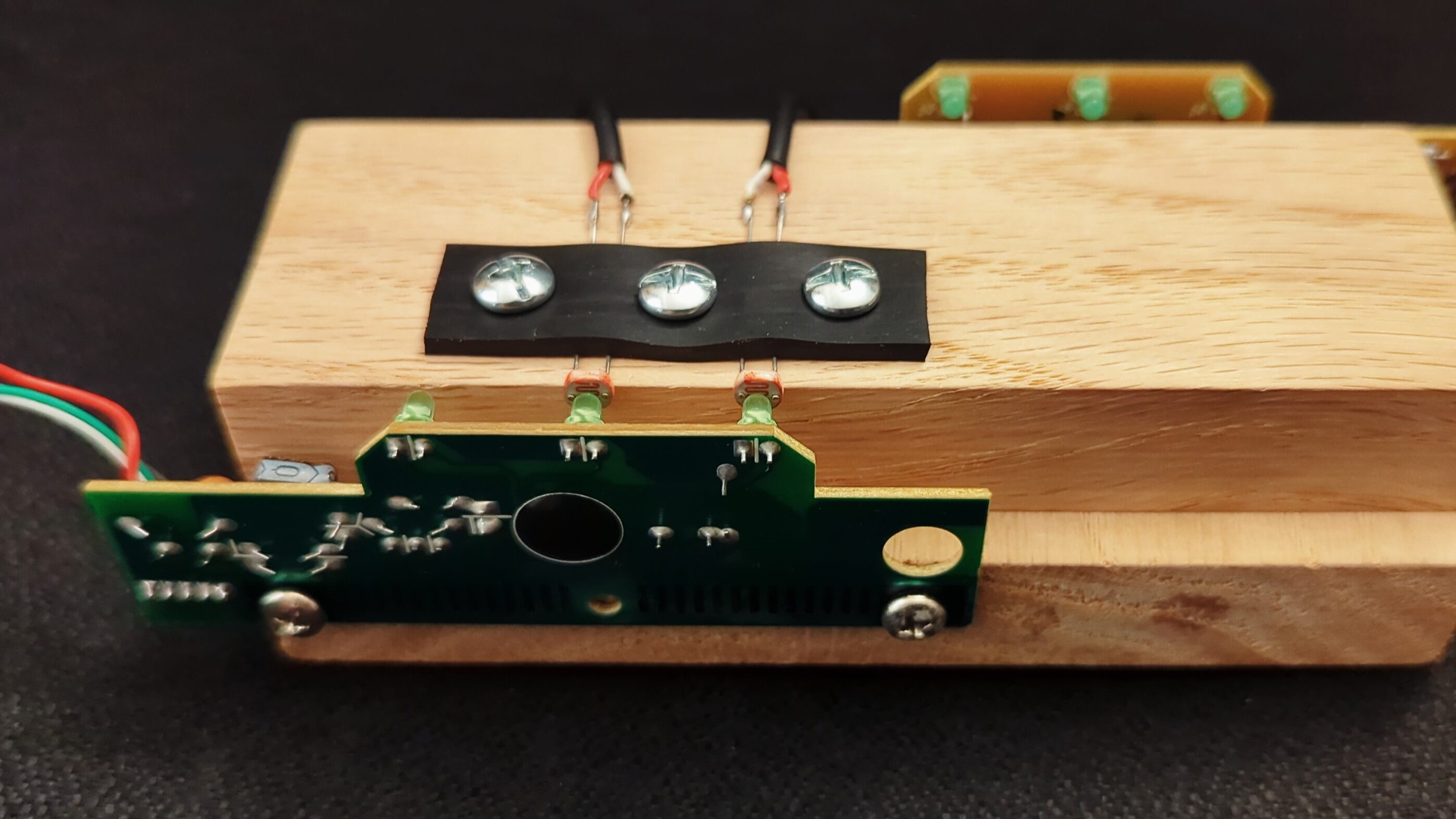
Keyboard Lights As An Airgap Attack Vector https://hackaday.com/2026/07/29/keyboard-lights-as-an-airgap-attack-vector/
#SecurityHacks #Airgap #Keyboard #Security
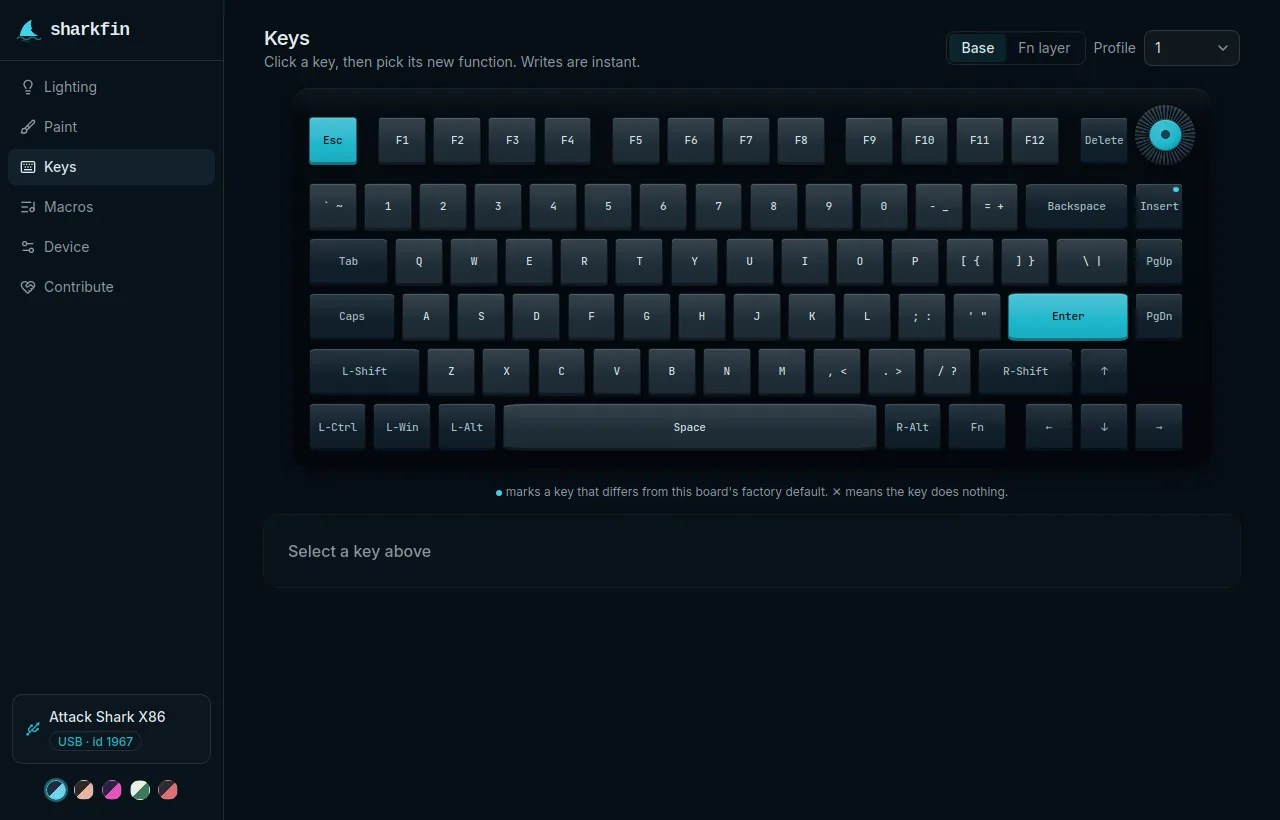
Sharkfin Bites Attack Shark https://hackaday.com/2026/07/28/sharkfin-bites-attack-shark/
#Classichacks #PeripheralsHacks #Configuration #Keyboard #Reverseengineering

Первый уровень печати:
Смотришь на клавиатуру во время печати. Ошибаешься раскладками потому что не видишь, что печатаешь.
Второй уровень печати:
Смотришь на текстовое поле во время печати. Моментально замечаешь если забыл переключить раскладку.
Третий уровень печати:
Смотришь в другое окно или не на монитор и думаешь о другом во время печати. Опять ошибаешься раскладками 😩
#log #thoughts #fun #keyboard #typing
The Keychron K11 Max is one of the best, most comfortable keyboards ever manufactured. Change my mind.
#mechanicalkeyboard #keyboard #keychron #ergomechkeyboards


Had some unused keyboard body laying arround here for a while. A Keychron K8 pro, that I used in the past.
Did build a fresh keyboard out of it today:
- Body: Keychrom K8 Pro ANSI
- Switches: Akko Rosewood (Linear, lubed)
- Keycaps: Cheap double-shot PBT set "Botanical"
For a budget build, it's super comfortable to type on and the plastic body of the K8-Pro with the Rosewood switches gives it a nice deep "thocky" sound profile while overall being rather quiet.
Definitely a keyboard that gets added to my rotation. (I have way too many keybs now .. lol)

I need some #keyboard nerd advice. My WFH daily driver is an IBM Model M. I'm now PT in a shared office & need to find something tactile but much quieter than that.
There are an overwhelming number of switch options now.
Seems like cherry brown is the quietest of the og tactile switches,
Matias makes a quiet ALPS (old apple) clone but it appears to be unobtanium here (tariffs?).
Varmilo is a Topre (electrocapacitive) clone but I can't find many places selling their tactile ones (violet)
Others?



A question for fans of #MechanicalKeyboard
Do 80% split keyboards exist? I'm not interested in anything that has less keys than a regular 80%. The split must be between G and H keys.
#MechanicalKeyboard #keyboard #keyboards


Fellow retro fedi folk, I need your advice/recommendation; I'm selling off a bunch of things, including all-but-one of my 68k Macs. I'm keeping my LC, but will be selling off the Color Classic I have restored over the past two years. With it I'll be selling a keyboard and mouse (of course), but I'm torn between which one I should sell along with the CC, and which one I should keep for myself.
On the one hand I have an "Apple Keyboard" that originally came from the US. It's working nicely, cleaned inside and out, and is not yellowed all that much. Actual mechanical keyboard, although it does have some odd decisions like a guiding poke thingy on the enter key that basically makes it harder to hit the key depending on where you mash, but whatever.
On the other hand I have an "Apple Keyboard II" (gotta love these names, thx Apple). Also working nicely, cleaned inside and out, has Korean keys, and is the less nice or premium feeling membrane style keyboard (kind of mushy). Slightly more yellowed, but not really all that bad I think (plus, I don't really mind the yellowing).
I'm torn because I think in basically all ways the "Apple Keyboard" is the better keyboard, but I like that the II is Korean, and is technically the correct matching keyboard with the LC, at least based on what I have been able to find through photos and whatnot. If I ever leave Korea and am able to bring my old Mac stuff with me, I suppose it'll also be nice to have that be this matching Korean keyboard?
So, my question to you is; Which one would you keep for yourself, and which one would you keep? Bonus points if you can share the why's.
Thanks so very much! And yes, if you think this is worth a boost, please by all means share and share alike :D
(I know this would've been a good thing to post as a poll, but my Fediverse corner does not support this. And so, old-school ask-and-answer style it is :D)
#AskFediverse #RetroComputing #VintageComputing #MacOS #Macintosh #68k #Keyboard #Korea #Korean #ADB

My first #PC #keyboard was a IBM Model F keyboard with 83 keys, and try as the decades have, my brain still struggles to accept the existence of a right [ctrl] key.
#RetroComputing


OK all my #electronics / #PCB fab #FediFrens 👋 I need [1] to get a custom #keypad designed & fabbed and I’m starting from a low low base of “sure I’ve put built plenty of electronics kits & learned a bit of electronics theory but mostly a long time ago & I haven’t designed anything myself”… 🙃
so what’s the best way to get started? 🤔
I found a couple of places that do custom #keyboards & have online key[board|pad] design tools, which seems about right. I don’t actually want to become an expert in custom PCB / #keyboard design, PCB fabbing, or managing Shenzhen supply chains – I just want to get this one thing made [2] and am happy [3] to exchange money for goods & services (within reason) to get it done
I’ve already looked at just using a gaming keypad to do the thing but I really want to integrate the keypad into the other thing to get it to where I want it to be…
OK, there’s no need to be coy I guess – I want to put a “real” keypad into my 1:1 #3Dprinted #Apollo #DSKY (WIP pic below)
what’s my optimal pathway to getting this to exist? I imagine that other DSKY nerds may want one once it exists, so the ability to turn it into a limited run after the initial prototypes are done would be a bonus
pls #boost4reach 🙏
(tagging in @projectgus@aus.social, @voltagex@infosec.exchange, & @Unixbigot@aus.social for starters…)
#AGC
[1] want
[2] yeah, I hear it too 🤪
[3] resigned