Posts
Hugging Face Said Last Week It Was Attacked. An Unreleased OpenAI Model Did It, OpenAI Now Says
Euki Period-Tracking App Actually Keeps Your Data Private
Vital Signals’ New Ring Brings Blood Pressure Monitoring to Your Finger
AI Barometer: the best AI for every job right now because choosing is difficult
HeliBoard is a privacy-conscious and customisable open-source keyboard for Android
Tech Bros Puzzled by Why AI Hasn’t “Massively Disrupted” Books Yet
Android is open source, but your phone isn’t—here’s why Google locked it down
German state of Mecklenburg-Vorpommern heads down the open source sovereignty road
Here’s what end-to-end encryption protects—and what it doesn’t
David Potter, the man who put Psion in the palm of your hand, logs off at 82
They’ve read the scroll thing! AI helps decipher ancient document charred by Vesuvius
Strava killed its free API, so I built my own fitness platform with Endurain and FitPub instead
Self-hosted Pinchflat will download YouTube videos or playlists into Jellyfin

“Pinchflat can technically download individual videos, but its strength lies in archiving entire channels and playlists at a time. For starters, Pinchflat lets me add channel and playlist URLs as sources, and I can modify the indexing frequency, download cutoff days, and retention settings. On conventional YouTube downloaders, I’d have to pull new videos manually every so often, while Pinchflat can archive fresh uploads after detecting them with its indexing algorithms.”
Personally I have been using TubeArchivist for this, but there are some key differences between the two:
- Pinchflat acts like a “Sonarr for YouTube.” Once you set up a source (channel or playlist), it downloads the videos, names them according to your template, and saves the NFO and poster images. It uses low resources.
- You install the TubeArchivist Jellyfin Plugin. This plugin talks to the TubeArchivist API to pull in metadata, thumbnails, and watches progress. TubeArchivist has its own dedicated web UI to browse your YouTube collection and is a bit heavier on resources (Requires Redis, Elasticsearch, and the App container).
See xda-developers.com/this-app-tu… or github.com/kieraneglin/pinchfl…
#Blog, #Jellyfin, #opensource, #selfhosting, #technology
Dangerzone — an open source app to safely open suspect PDFs, office docs, or images

Dangerzone works like this: You give it a document that you don’t know if you can trust (for example, an email attachment). Inside a sandbox, Dangerzone converts the document to a PDF (if it isn’t already one), and then converts the PDF into raw pixel data: a huge list of RGB colour values for each page. Then, Dangerzone takes this pixel data and converts it back into a PDF.
It has been independently audited and apart from the obvious use by journalists and similar professions, even every day users can be most often targeted by attachments that carry payloads of malware. This is exactly how bad actors bypass firewalls, and secure messengers like Signal.
I would not necessarily put every document I receive through this process as it does at least double or triple the size of the file (converts every page to an image). But from anyone you don’t know, this is a useful tool to have ready to use. Everything is processed locally on your machine, and it will install on Linux, Windows, and macOS.
See dangerzone.rocks/category/unca…
#Blog, #opensource, #security, #technology
New App Detects the BT Fingerprint of Smart Glasses and Warns You When Someone Is Using Them Nearby

“Outdoors, the app works within 32 to 50 feet; indoors in crowds, that drops to 10 to 32 feet — enough range to identify a person wearing smart glasses in your vicinity. Nearby Glasses works by flagging Bluetooth SIG assigned numbers, unique alphanumeric codes identifying devices based on their brand. Assigned numbers are mandatory for devices utilizing Bluetooth, meaning that gear made by companies like Luxottica Group SpA — the firm manufacturing Meta’s Ray-Ban Smart Glasses — is at least somewhat identifiable for anyone who knows where to look.”
So, yes not perfect, as you may get false positives if someone is for example walking around the mall wearing their Oculus Rift headset. But it is interesting to see some pushback happening against Big Tech’s smart glasses. But this early is still in early release, so I imagine it will mature more still.
See futurism.com/robots-and-machin…
#Blog, #privacy, #smartglasses, #technology
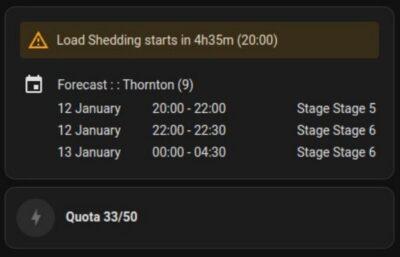
Load Shedding integration on Home Assistant with EskomSePush API

Yes I know the EskomSePush mobile apps will give either a 15 minute or 55 minute warning ahead of the scheduled load shedding window for a zone area in South Africa, but sometimes you need a custom time alert eg. 23 minutes, or you want it to announce it over your smart speakers, or to add other conditions.
The now ever-changing load shedding schedule in South Africa has started to make things pretty complicated to plan around. If it was just fixed at say Stage 4 or 5 then we’d all know what we’re doing when (or not doing). But too many cakes are now flopping.
EskomSePush has been rising up as one of the most dependable load schedule apps in South Africa, and they have an API that can be used too. The API is free to use for up to 50 requests per day. The API allows easy integration with something like Home Assistant (or even a Python or other app you want to create).
I’ve tested two integrations, and whilst the first one was a bit more manual, the one linked below is way easier to get going with. Yes, you do still need to get your free API code, but the integration has a wizard that will guide you on the process.
The only thing you then really have to do is to create your dashboard cards. I copied the examples they have on the GitHub project. Note though that one entity is called with ‘cape-town’ in it’s name, and it needs to be ‘capetown’ if you are in the Cape Town area. And the code example uses a Joburg area name, so that also just needs to be changed to what ever your area is. And then you can have fun with it.
I’m just displaying the upcoming schedule with the time to the next load shedding, and have set up an audible alert before load shedding starts, so we can turn the shower hot water on if required. But another option is to even send an alert to a Telegram group, so you can have a lot of neighbours subscribing to your Telegram channel for early warnings. Another idea is to check the duration of the upcoming load shedding slot, and give a different warning for the 4-hour ones. The options are endless!!
See github.com/wernerhp/ha.integra…
You can also see what all I’m doing with my own Home Assistant at github.com/Danie10/gadgeteerza…
#technology #SouthAfrica #loadshedding #EskomSePush #HomeAssistant
#Blog, ##eskomsepush, ##homeassistant, ##loadshedding, ##southafrica, ##technology